
This is a really quick post about something I’m surprised more Mac users seem to not to know about. Preview, is Mac OS’s standard viewing application for many document types including images and PDF documents – unless you’ve installed Adobe Acrobat Reader, that is.
And it has some really neat features, particularly relating to images. The one I want to highlight is a way to extract text from scans of textual content – essentially retrospective OCR. Let’s look at an example. Here’s a receipt for a new Webcam I purchased recently.

It’s a bit crumpled, but reasonably aligned. Say I wanted to get some information from this scanned document. I’m viewing it in preview. If I hover my mouse near the text on the receipt, the cursor changes to a text insertion cursor, which provides the clue about what we can do. We can then begin to select the text from the image that we want to extract. At first it feels “counter-intuitive”, but you can continue to select text across multiple lines of text, if you need to, as shown below.
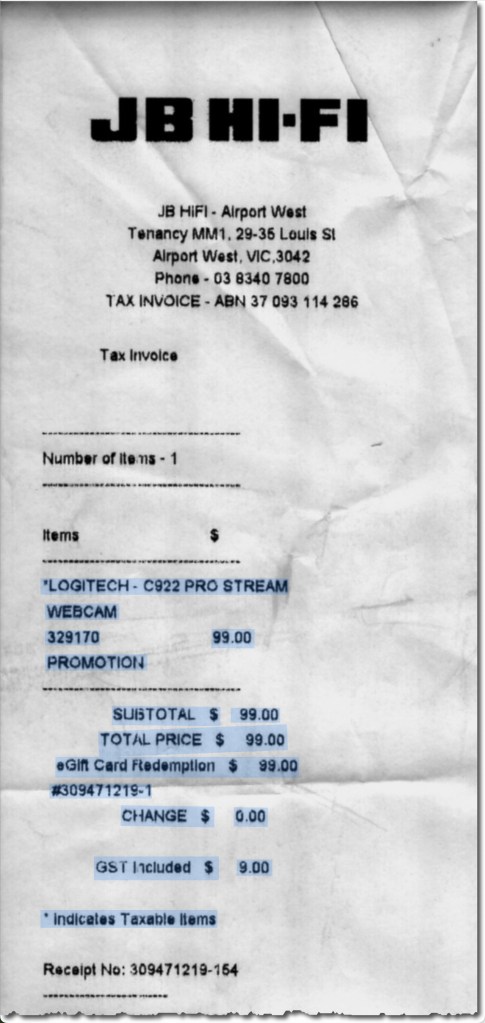
Now copy the text, and if we paste that text into another document, we see the following:
*LOGITECH - C922 PRO STREAM

WEBCAM

329170   99.00

PROMOTION

SUBTOTAL $  99.00

TOTAL PRICE $ 99.00

eGift Card Fedemption $ 99.00

#309471219-1

CHANGE $  0.00

GST Included $  9.00

* Indicates Taxable Items
Now the text isn’t formatted in any way, and I can see one error in the interpretation of the text – essentially the OCR that has been applied. The word should be redemption, not “fedemption”. However, I’m sure you’ll agree, it’s a pretty handy way to “capture” text from an already scanned image, and the functionality is present in all recent versions of the standard Mac OS Preview app.
Hopefully this proves useful to those who aren’t familiar with this functionality.
 TA's Ramblings
Leave a comment